
People often search for one tool that will make a Huawei phone behave exactly like every other Android device. In daily use, that is rarely the most useful way to think about it. A better setup is built around the services you need, the safest source for each one and a fallback when the native app is not available.
Use Huawei’s own app tools first
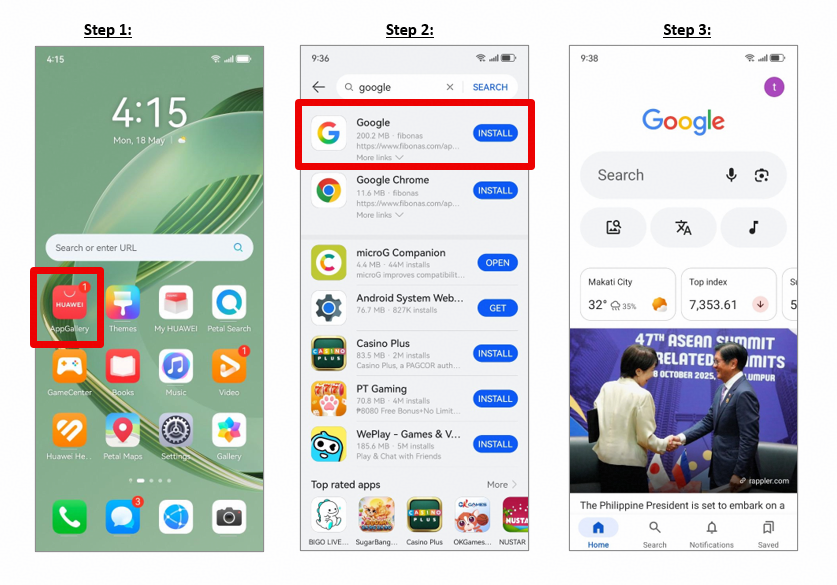
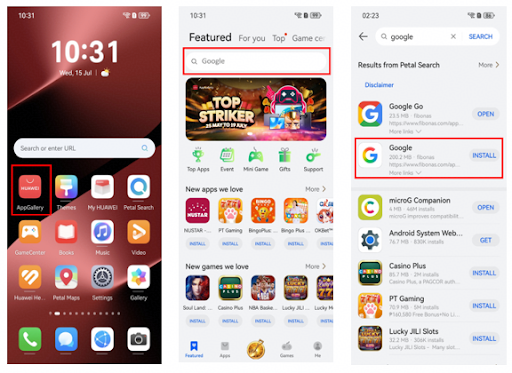
AppGallery is Huawei’s official app platform, so it should be the first stop for local and international apps. Petal Search can help locate services beyond the store and may present them as native apps, Quick Apps or web apps.
That makes google installer for huawei less about finding one installer and more about choosing the right route for each service. The result is usually simpler and easier to maintain.
Move data, then rebuild apps carefully
When switching from an older phone, Phone Clone can transfer basic data such as contacts, calendar entries, photos and videos. It is a useful first step, but it does not remove the need to check important apps after migration.
Open banking, messaging, work and travel apps one by one. Confirm that you can sign in, receive notifications and complete the actions you actually use. This takes a little longer on day one but avoids surprises later.
Do not ignore the web
A web app is not automatically a second-class option. For services you use occasionally, the official mobile website may be faster, lighter and easier to update than another installed package. Petal Search itself can direct users to web sources when native or Quick Apps are not available.
You can add frequently used web services to the home screen, which makes them easier to reach without adding another installer or duplicate app.
Keep security and updates simple
Avoid unofficial bundles that promise to install many services at once but do not clearly explain where the packages come from. For sensitive apps, stick to AppGallery or the provider’s verified website.
The Huawei Community article linked through google installer for huawei is useful background for Google-related setup and troubleshooting. In practice, the best Huawei setup is usually a mix of official apps, trusted web services and a few local alternatives rather than a phone filled with overlapping installation tools.